Create a clear, shareable version of your project data for reports, reviews, and documentation.
Move project information forward
Export & Sharing
Take your project data where it needs to go. Export the information you need from Mynix in formats that work for reporting, analysis, sharing, and record keeping. Choose the data, keep the view focused, and export it in the format that fits your next step.
- file_downloadExport
- filter_listFiltered Data
- table_chartMultiple Formats
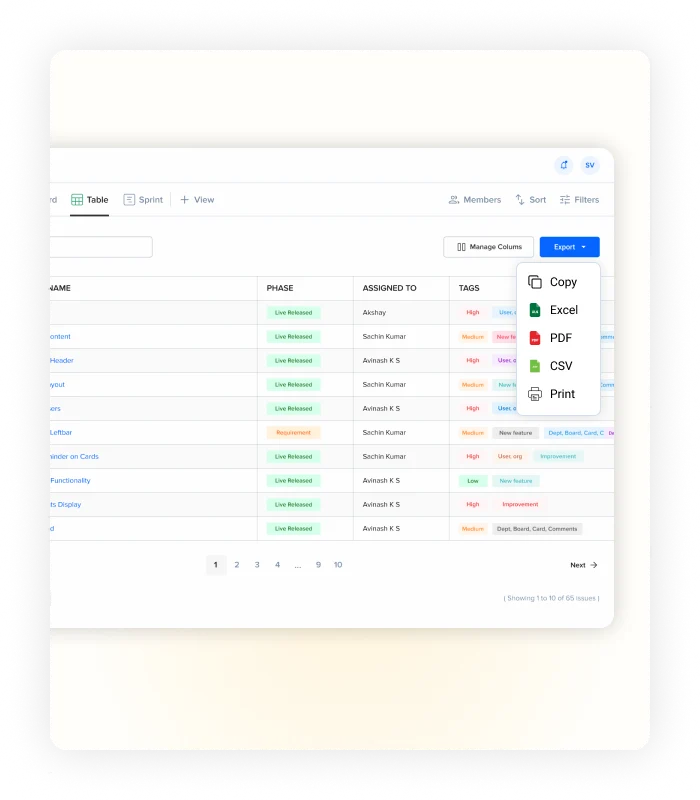
Export what matters
Take the right data beyond Mynix.
You don't always need to work with project data inside the platform. Export the information you need and continue working with it wherever it's most useful.
Excel
Work with your data in a spreadsheet for analysis, calculations, and further processing.
CSV
Export structured data for analysis, migration, or use with other systems and tools.
Create a clean version of your data for meetings, reviews, or a physical copy.
Export only what you need
Start with the view that matters.
Keep unnecessary information out of your exports by narrowing the data before you export it.
-
filter_list
Export filtered data
Apply filters to your project and export only the records that match your current view.
-
check_box
Export selected records
Choose specific records when you only need a particular set of information.
-
view_column
Keep relevant columns
Control the information included in your export so the output stays focused.
Built for different ways of working
One project. Different destinations.
The same project data can serve different purposes. Export it in the format that makes sense for the person or workflow receiving it.
Turn project data into shareable reports
Create a focused PDF when project information needs to be reviewed or shared outside the platform.
Continue working with your data
Export to Excel or CSV when you need calculations, deeper analysis, or additional processing.
Share information with your team
Give others relevant project data without requiring them to work directly inside your Mynix project.
Keep your exports focused
From project data to useful output.
Export & Sharing makes it easier to move information from your project into the next part of your workflow without manually copying records or rebuilding the data elsewhere.
A copy for later
Keep important information close.
archive
Keep a copy of important information
Export project data when you need a separate copy for documentation or future reference.
sync_alt
Move data without rebuilding it
Carry structured project information into the next tool without retyping records by hand.
Your data, ready for what's next.
Export project information in the format your workflow needs — whether you're preparing a report, analyzing data, sharing project information, or keeping a record.