Text input
Capture names, titles, descriptions, and other text-based information.
Form Builder · structured data collection
Create powerful, professional forms with a visual drag-and-drop designer. Capture the right information, apply business rules, and connect data directly to the workflows that use it.
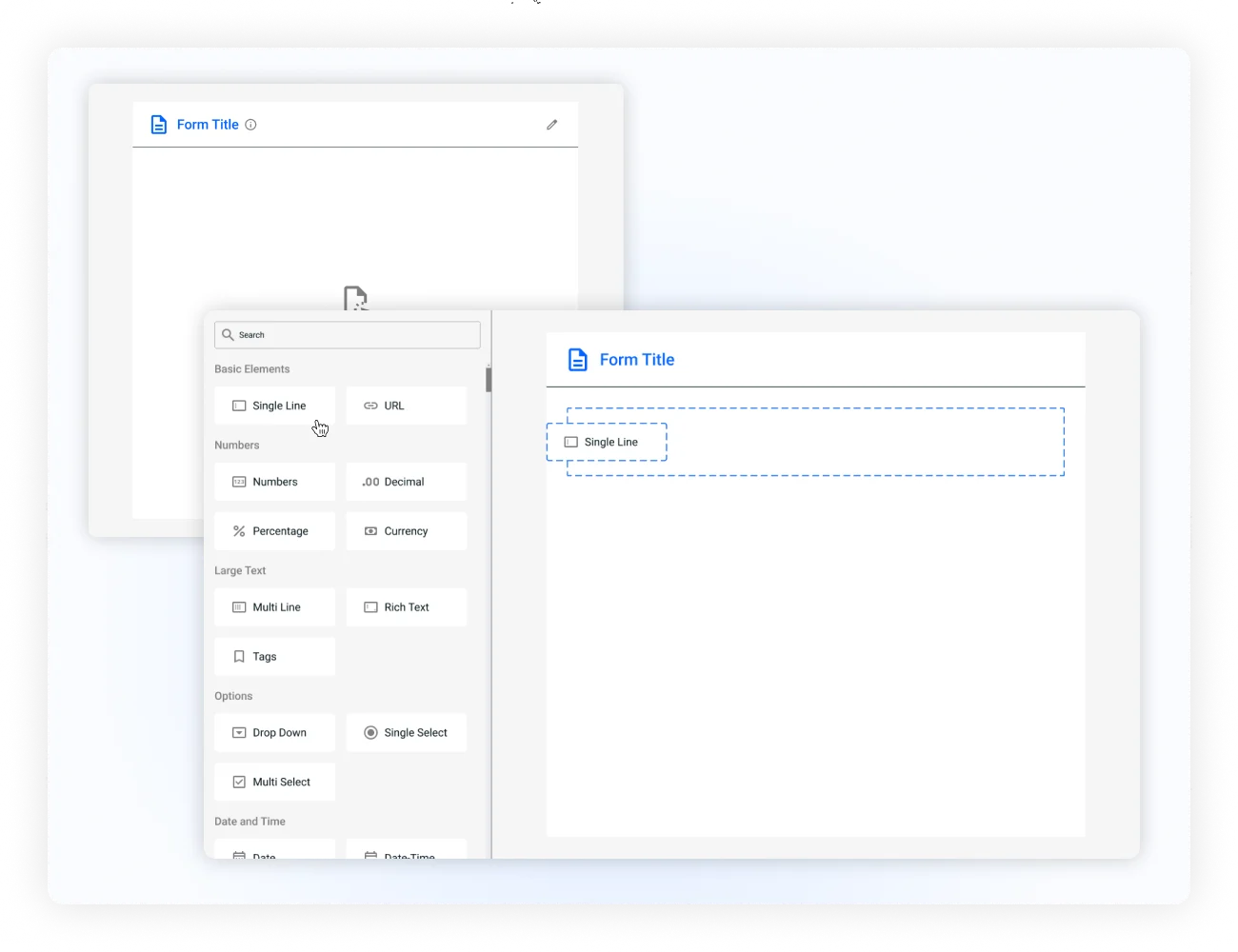
Design forms visually
The Form Builder gives teams a visual environment for creating forms without relying on developers or complex configuration. Drag fields into place, organize the layout, configure each field, and preview the result as you build.
Refine the form before it reaches users so the final experience is clear, responsive, and ready for the workflow behind it.
Place fields exactly where they belong and rearrange the form as requirements change.
See the data collection experience while you are building it.
Configure layouts, field behavior, themes, and styling from one visual workspace.
Create forms that remain usable across desktop, tablet, and mobile devices.
Start with the right field
A form is only as useful as the information it collects. Use 25+ field types to match the needs of the process instead of forcing every input into the same format.
Capture names, titles, descriptions, and other text-based information.
Let users select from a controlled list of available options.
Use radio buttons and checkboxes for single or multiple selections.
Collect files, dates, times, and 25+ additional specialized data types.
Make forms respond to input
Smart logic lets forms respond to what users provide, showing relevant questions and applying business rules without overwhelming the initial experience.
Show additional questions when a particular option is selected.
Move users past fields that do not apply to their situation.
Use input-based visibility and rules to create a responsive form experience.
Keep submitted data accurate
Field Validation creates a reliable data-entry layer by enforcing requirements and identifying incomplete or invalid data at the point of entry.
Make sure essential information is present before submission.
Apply requirements that reflect how the organization handles data.
Change validation requirements based on the information provided.
Give downstream workflows more reliable information to act on.
Connect forms to workflows
Workflow Integration connects form submissions with the appropriate process so data collection happens where it is needed. Information can move into the workflow without requiring teams to manually recreate or transfer it.
Collect information relevant to the current phase instead of presenting every field at once.
Use submitted information as part of workflow actions and downstream decisions.
Move collected information into the right process without manual re-entry.
Protect sensitive form data with field-level permissions and appropriate workflow visibility.
From form design to business process
Build the form visually with the drag-and-drop designer.
Add the right information types from the field library.
Show relevant fields dynamically based on user input.
Enforce data requirements before the submission moves forward.
Give teams control over form data
Form Builder combines security and responsiveness so organizations can protect sensitive information while keeping forms accessible on the devices teams actually use.
Use field-level permissions and controlled access to protect collected information.
Keep layouts usable across desktop, tablet, and mobile experiences.
Make data collection comfortable for users with touch-friendly interactions.
Move reliable submissions into the workflow that depends on them.
Build forms around the business
Form Builder gives teams the flexibility to collect requests, onboarding information, customer details, internal data, and operational submissions around their actual requirements.
Create professional forms without relying on developers.
Match information types to the requirements of the process.
Use logic, validation, and permissions to improve submissions.
Send collected information directly into the process that uses it.
Start with the drag-and-drop designer and create professional, intelligent forms in minutes.