Critical
Immediate attention for high-impact work.
Customization · service commitments
Define service level agreements and time-based constraints across your workflows to keep work moving, maintain service quality, and measure performance against clear commitments.
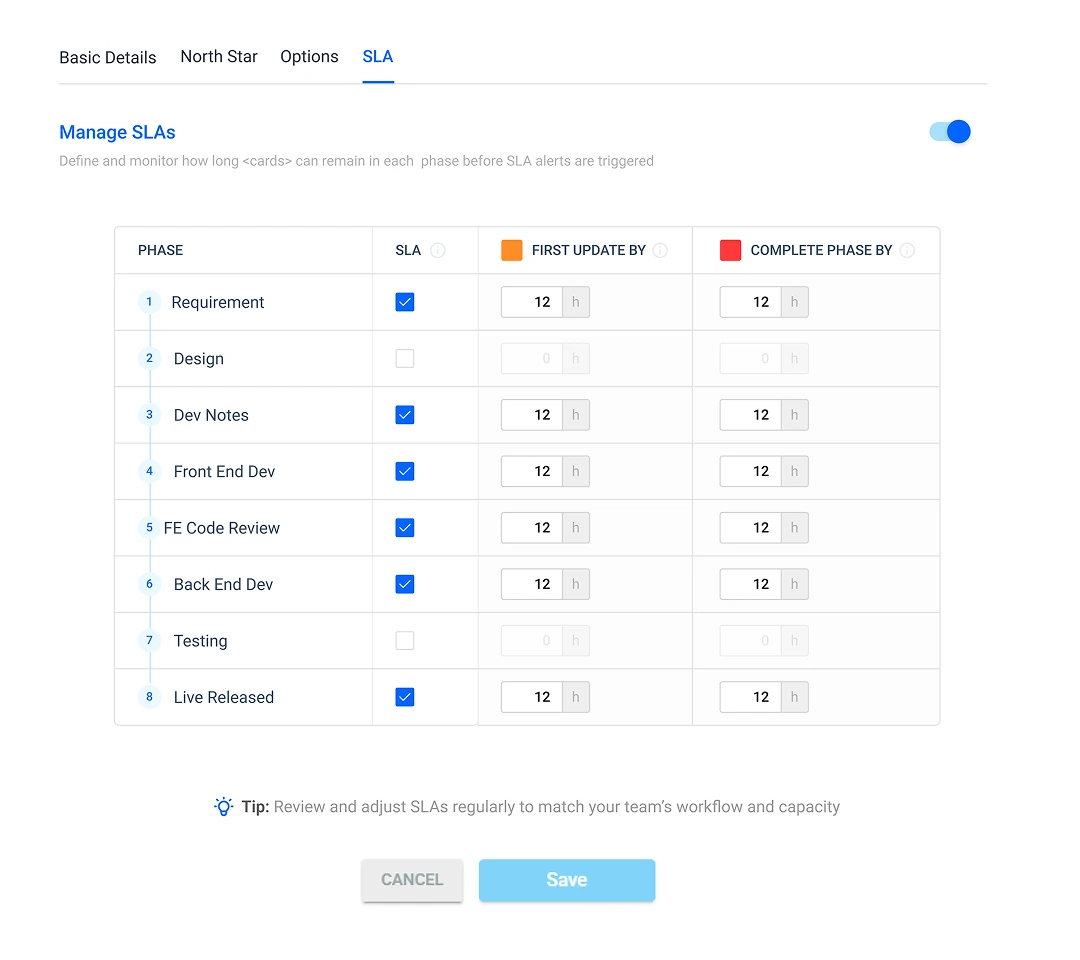
Turn service commitments into rules
Every workflow has time-sensitive work. SLA Management lets you define how long work can remain in a phase, when teams should be warned, how priorities change targets, and what happens when work falls behind.
Stay ahead of deadlines with automated tracking, early warnings, and escalation rules that help prevent breaches.
Define time limits for each workflow phase.
Set warning thresholds before the SLA is exhausted.
Use escalation rules and overdue indicators.
Track time at the workflow phase level
Set a maximum amount of time for each workflow phase and let Mynix monitor duration automatically. As an item moves through the workflow, its SLA status changes according to the configured timeframe.
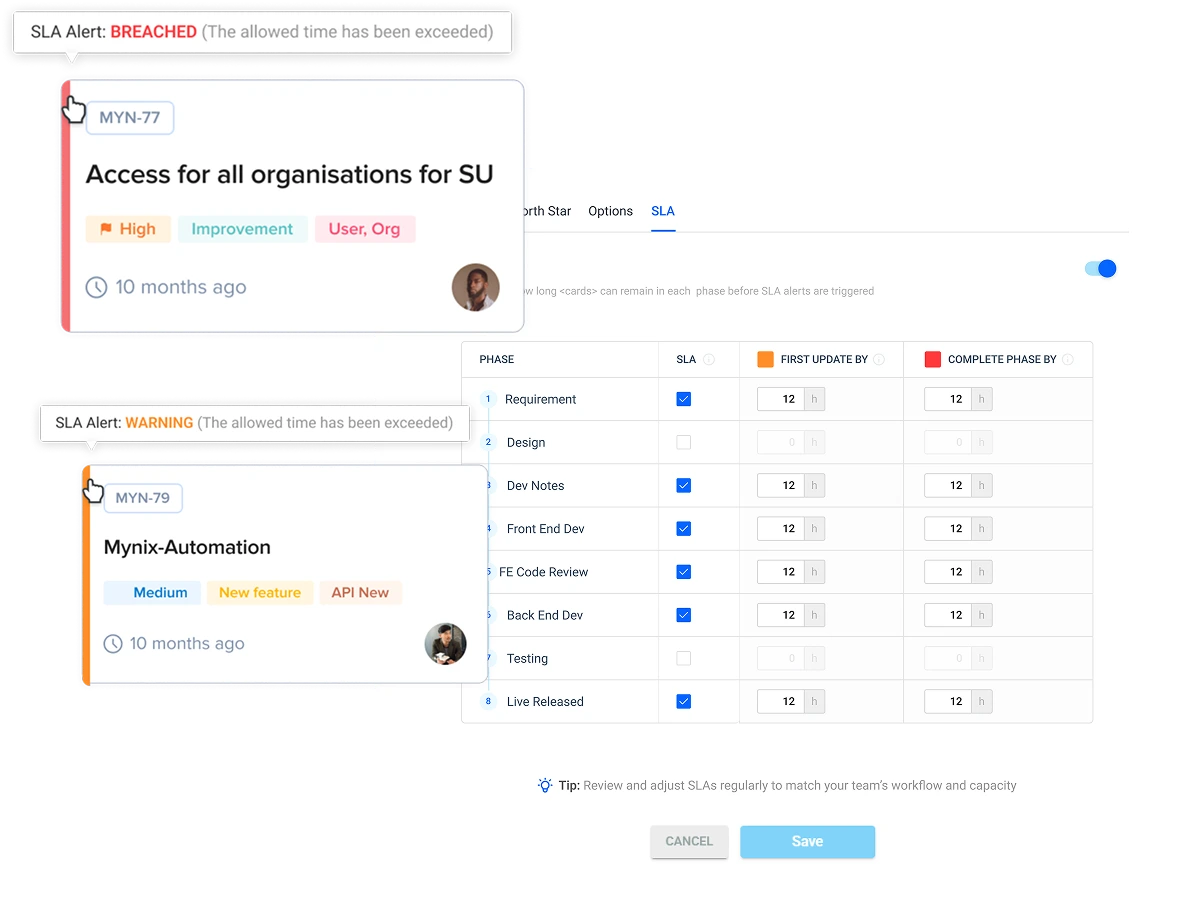
See risk before it becomes a breach
A breach should not be the first time your team discovers that work is running late. Configure an early warning, such as when 75% of the allowed time has been consumed.
Move approaching work higher in the queue before the available time runs out.
Identify what is slowing the phase and get the right people involved.
Move ownership or contact stakeholders before the commitment is missed.
Give every priority the right timeframe
Define different response and resolution expectations, warning thresholds, and escalation behavior for each priority.
Immediate attention for high-impact work.
Short targets for important requests.
Planned service expectations for normal work.
Longer targets for lower urgency items.
Escalate when attention is needed
Automatic escalation determines who should be notified when an SLA is approaching or has been exceeded.
Keep leaders aware of work that may affect commitments.
Route approaching or overdue work to the people closest to the process.
Notify the stakeholders responsible for resolving the delay.
Move from early warning to intervention instead of relying on manual monitoring.
Make SLA health visible
Color-coded cards and phase indicators provide status directly inside the workflow.
Configure SLA rules in six steps
Administrators control how time commitments are defined, communicated, and refined.
Choose the maximum time for each workflow phase and priority.
Choose when early warnings should trigger, such as 75%.
Define Critical, High, Medium, and Low targets.
Specify who is notified when work approaches or exceeds its SLA.
Choose colors and display options for SLA status.
Review performance data and refine rules to match capacity.
Start with realistic targets
Set targets using historical performance, team capacity, client expectations, and service complexity. Once the team consistently meets them, gradually tighten targets as process efficiency improves.
Overly aggressive SLAs can create pressure, encourage rushed work, and reduce quality. Well-calibrated SLAs create a realistic path to meeting commitments.
Example priority-based configuration
These values are examples rather than fixed recommendations. Define targets based on capacity, client expectations, service complexity, and the commitments associated with each work type.
Measure SLA performance over time
SLA management helps teams understand whether their processes consistently meet expectations and where targets need adjustment.
Identify recurring delays in specific workflow phases.
Track response and resolution performance over time.
Separate response-time and resolution-time problems.
Support audits, contracts, certifications, and reviews.
Built for time-sensitive operations
Maintain response and resolution times for tickets, with critical issues escalated immediately. Common SLAs include first response within 2 hours and resolution within 24–48 hours.
Manage client commitments through time-based project phases, milestone deadlines, communication response, and deliverable review timeframes.
Track sprint commitments, bug response times, delivery deadlines, and code review within 24 hours.
Maintain predictable hiring and employee-request timelines, including interview scheduling within 3 days, leave approval within 2 days, and offer letters within 1 week.
Keep invoice approval within 5 days, expense processing within 3 days, and payment processing within 7 days.
Before it becomes a breach
Define realistic commitments, monitor time automatically, warn teams before deadlines are exhausted, and escalate when intervention is required.
Define phase, priority, warning, and escalation rules.
Use visible status indicators and performance analytics.
Prioritize, remove blockers, reassign, or escalate before the breach.
Refine targets using historical results and team capacity.
Set realistic targets, see the risk, and act before the breach with phase-level SLA management.