Change made
A user edits a field, description, task, or other card information.
Card editing protection
Protect card edits from accidental closure, navigation, or misclicks. Protect Unsaved Data automatically detects changes and warns users before their work is discarded.
About the feature
Protect Unsaved Data continuously monitors a card while it is being edited. When the current version differs from the last saved state, Mynix knows there is work worth protecting.
Protection applies across descriptions, custom fields, task lists, and other editable card information.
Keep detailed notes safe while they are still being written.
Protect changes to structured information and business data.
Keep newly added tasks intact if an accidental close occurs.
Cover the information users change as they work through a card.
Detect changes automatically
The system marks a card as MODIFIED as soon as an edit differs from its saved version. Users are not interrupted with unnecessary confirmation messages when nothing has changed.
A user edits a field, description, task, or other card information.
Mynix compares the current card with the last saved state.
A close, ESC key, cancel, or navigation action could discard the edit.
The user decides whether to discard the changes or return to editing.
Protect against accidental closure
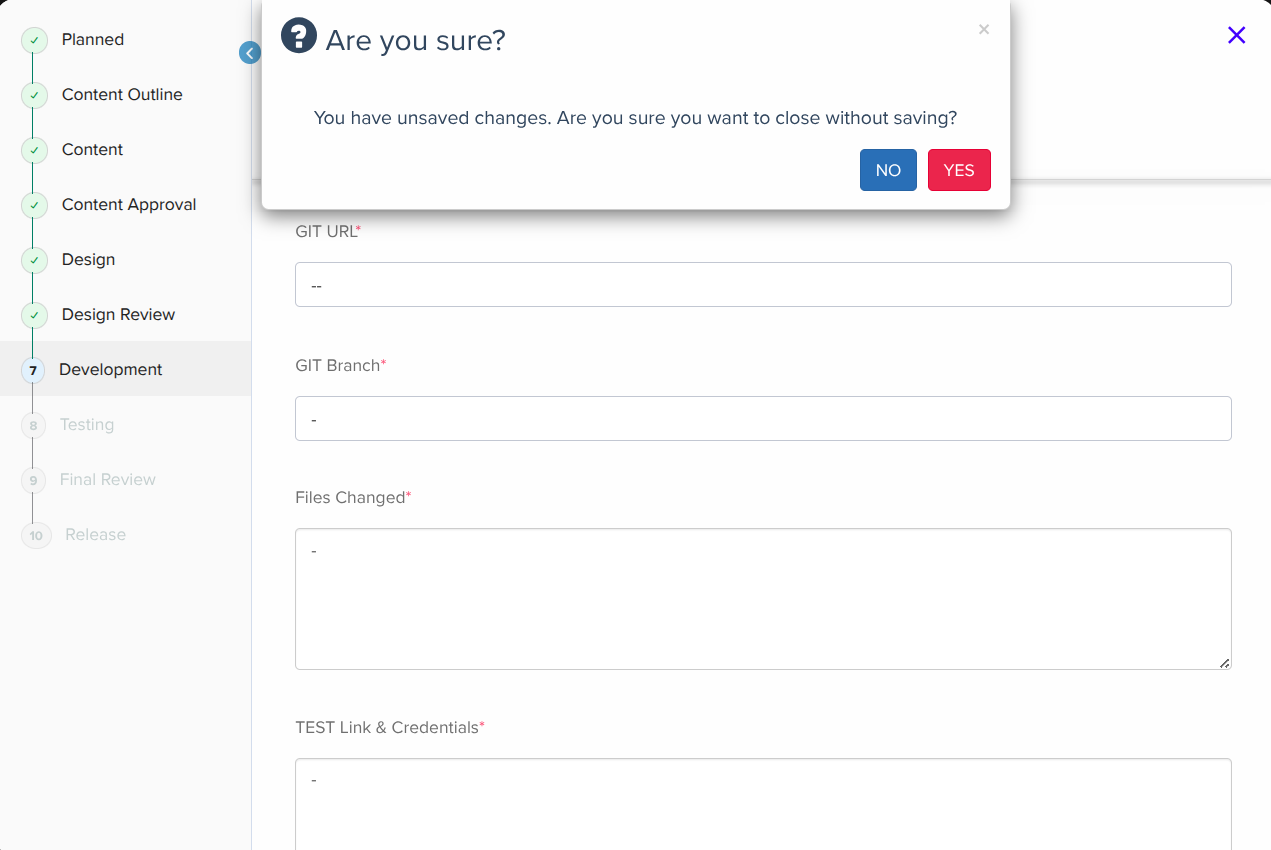
When a modified card is about to close, Mynix intercepts the action and gives the user a clear choice before anything is discarded.
Mynix displays a confirmation before the card closes:
Keep unsaved work intact
The prompt makes the consequence clear and gives users a safe way to cancel an accidental close without recreating their work.
Why it matters
A safety net across card editing
Detailed edits should not feel fragile. Mynix protects the work that exists between opening a card and committing the final version.
Stop accidental loss caused by misclicks, keyboard actions, or navigation.
Users do not have to re-enter information lost during an accidental close.
Important card updates are less likely to disappear before they are committed.
People can make detailed edits knowing Mynix will warn them first.
No setup required
Protect Unsaved Data is automatically enabled. There is no configuration, activation, or special workflow for users to learn.
Start from the Project Board and enter a card.
Modify a description, field, task list, or other card information.
Close the card, press ESC, or take another action without saving.
Choose whether to discard the work or return to editing.
The experience in practice
A user can update a description, modify custom fields, and add items to a task list. If they click outside the card or press ESC, Mynix recognizes that the card has been modified and asks for confirmation instead of immediately closing it.
Multiple changes can be made before saving. An accidental close becomes a confirmation step instead of a destructive action.
Project Board → Open a Card → Edit → Make Changes → Try Closing Without Saving.
Explore card editing in Mynix and experience automatic protection against unsaved data loss.