Departments
Bring projects together around the business function that owns them.
Core platform · portfolio structure
Organize related projects into structured groups that make complex portfolios easier to manage, navigate, and control.
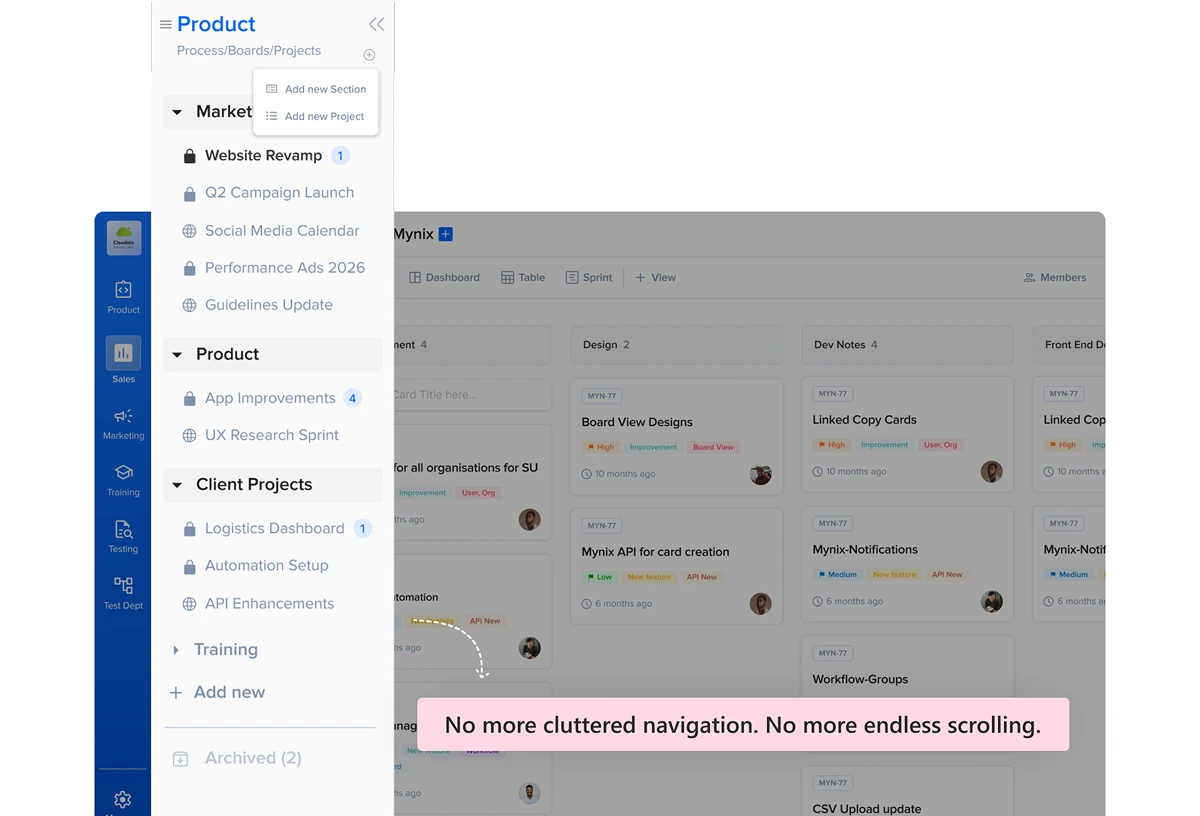
One layer above the project
Project Groups give Mynix a higher-level organizational layer above individual projects. Teams can create logical collections based on departments, clients, internal workstreams, or any other business relationship.
Keep individual project execution intact while making the larger collection easier to understand.
Collect related projects around the way your organization actually works.
Find connected work without scanning every project independently.
Manage shared access and settings at a higher organizational level.
Give teams and stakeholders a clearer view of related work.
Smart categorization
A group can represent almost any logical relationship that makes sense for your organization.
Bring projects together around the business function that owns them.
Keep every project connected to the client relationship it supports.
Organize internal work around programs, initiatives, or shared outcomes.
Use a structure that reflects operational areas and related project collections.
Better visibility as you scale
Groups add an organizational layer without changing the projects themselves, so teams can keep managing individual work while understanding the larger portfolio.
Move quickly from a group to the projects connected to it.
See how separate projects fit into a department, client, or initiative.
Maintain a logical workspace structure as the portfolio expands.
Centralized control
Project Groups simplify access and resource management when multiple projects share the same teams, settings, or business context.
Keep the people working across related projects connected to the same group.
Apply a consistent access approach across a collection of related work.
Reduce repetitive administration by managing shared project context together.
Keep related resources and business information aligned across the portfolio.
Departmental alignment
Project Groups can reflect how different parts of the organization operate and help stakeholders see the work around a department, client, or business initiative.
Client acquisition projects stay connected to the commercial function that owns them.
Campaign projects can be understood as one coordinated workstream.
Product development projects remain visible as part of the wider delivery portfolio.
People operations and financial operations can each keep a clear project context.
Setup flow
Open the Project section from the Mynix sidebar.
Start a new group within the project view.
Add projects, items, cards, or members to the group.
Monitor the group's data efficiently from the dashboard.
Project Groups in action
Once the group is created, related projects, items, cards, and members can be managed in a shared context. This gives stakeholders a clearer view without forcing them to navigate unrelated projects one by one.
Keep the detail of each project while making the portfolio easier to scan and control.
Start from the Project section and view the collection in its shared context.
See the projects, items, and cards connected to the group.
Use the dashboard to keep the group visible as work changes.
The result
Group projects around the way your organization works, centralize relevant access and settings, and give teams a clearer view across related work.
Organize projects around departments, clients, and workstreams.
Find related work without losing the detail of each project.
Keep teams aligned around the projects they manage together.
Manage relevant access and settings at a higher level.
Create a group in your Project section and make portfolio management easier for your teams.