Project-level discussions
Talk about updates, goals, blockers, dependencies, decisions, and releases in one shared space.
Project-level collaboration
Keep project updates, decisions, blockers, issue references, and team coordination connected to the work. Give every project a shared conversation space without forcing every discussion into an individual issue.
What the board changes
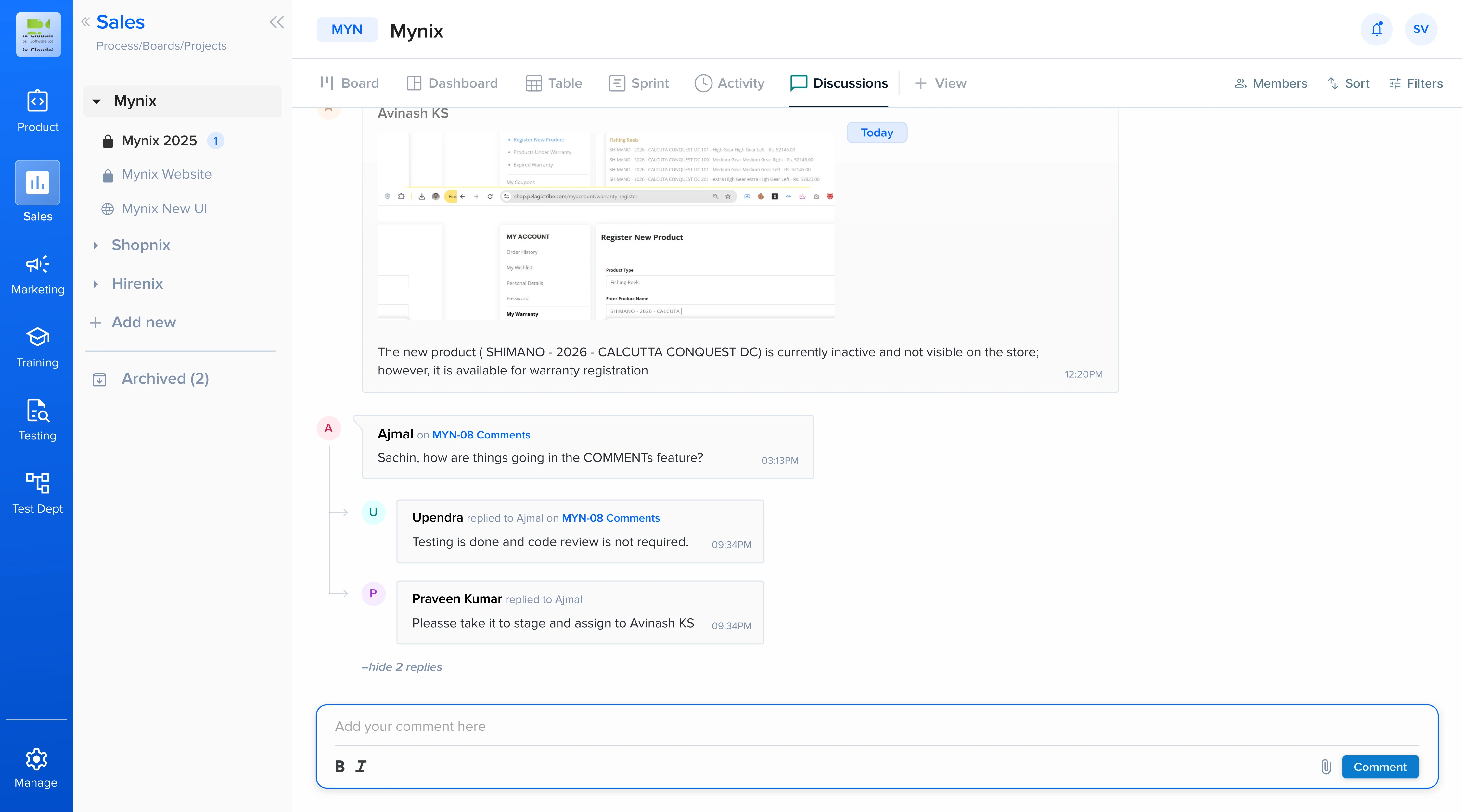
Project Discussion Board extends Mynix's familiar Issue to Comments experience to the project level, so broader conversations remain easy to find, follow, and connect to active work.
Talk about updates, goals, blockers, dependencies, decisions, and releases in one shared space.
Reference specific issues so context can lead directly to the work that needs attention.
Keep decisions and project history available instead of losing them across separate channels.
Bring contributors, stakeholders, and issue owners into the same project context.
A familiar interaction
The new Discussion tab sits alongside the existing project views. Users can open conversations, post comments, reply, like, mention people, and reference issues without learning a separate communication system.
Find project-level conversations next to the views already used by the team.
Share an update or continue an existing conversation in context.
Acknowledge a project update without adding unnecessary noise.
Keep prior discussions available when the team needs the reasoning behind a decision.
Mention the right people
Use @USER to involve the teammate responsible for a topic. Direct mentions help teams request input, highlight blockers, involve stakeholders, and share decisions with the people who need to see them.
Instead of posting a general message and waiting for the right person to notice it, identify the people who need to respond.
Connect context to action
Use @ISSUE_ID when a project discussion relates to specific work. The conversation stays visible at the project level while giving people a direct path to the issue being discussed.
The API integration is blocked until the authentication issue is resolved. @ISSUE-245
Anyone reading the discussion can click straight through to the tagged issue — no need to search or cross-reference.
One conversation, two contexts
When a project discussion tags an issue, the comment should remain available in both places. A project manager sees the broader conversation; an issue owner sees the same context alongside the work.
Fast access, complete context
The Discussion tab surfaces the latest 50 discussions and comments for quick access. Longer content can expand with Show more when the complete message is needed.
Review the most recent 50 discussions and comments without searching through the entire history.
Expand longer content only when the full message and context are relevant.
Create, reply, like, mention people, and tag issues from the same discussion space.
A simple project rhythm
Using the feature requires no separate setup. The Discussion tab is auto-enabled and ready to support the next project update.
Go to the relevant board.
Share an update or question.
Involve people and issues.
Continue the conversation.
Follow the related work.
Built for cross-functional work
Use project discussions wherever the work crosses people, teams, and individual issues.
Discuss release scope, dependencies, blockers, architecture decisions, and linked issues with traceability.
Coordinate escalations, service updates, recurring problems, and related support issues in project context.
Bring project managers, contributors, stakeholders, and issue owners into one discussion space.
Why it matters
Without a project-level space, teams fall back to chat tools, calls, email threads, scattered issue comments, and separate notes. Project Discussion Board brings that context back into the project and keeps the history connected to the work.
Keep project-wide communication inside the project.
Connect broader conversations directly to specific work.
Mention the people who need to see or respond.
The feature is auto-enabled for every project.
Related features
Project conversations work best alongside the tools that organize, assign, and preserve the work.
Bring project updates, team discussions, issue references, and decisions into one shared space inside Mynix.